RAM/CPU prices fluctuate daily. Contact us to secure stock.

Language

Home Construction
Construction

Rugged Hardware for Construction Sites

From BIM coordination in the site office to punch-list QA on active floors — devices specified for teams that work in dust, sunlight and weather every day.

1–3 day UPS delivery

EU stock, 40+ countries

Pre-configured

OS imaging, MDM, asset tags


12-mo / 3-yr warranty

Pre-Owned / New In Box

Quick Answer

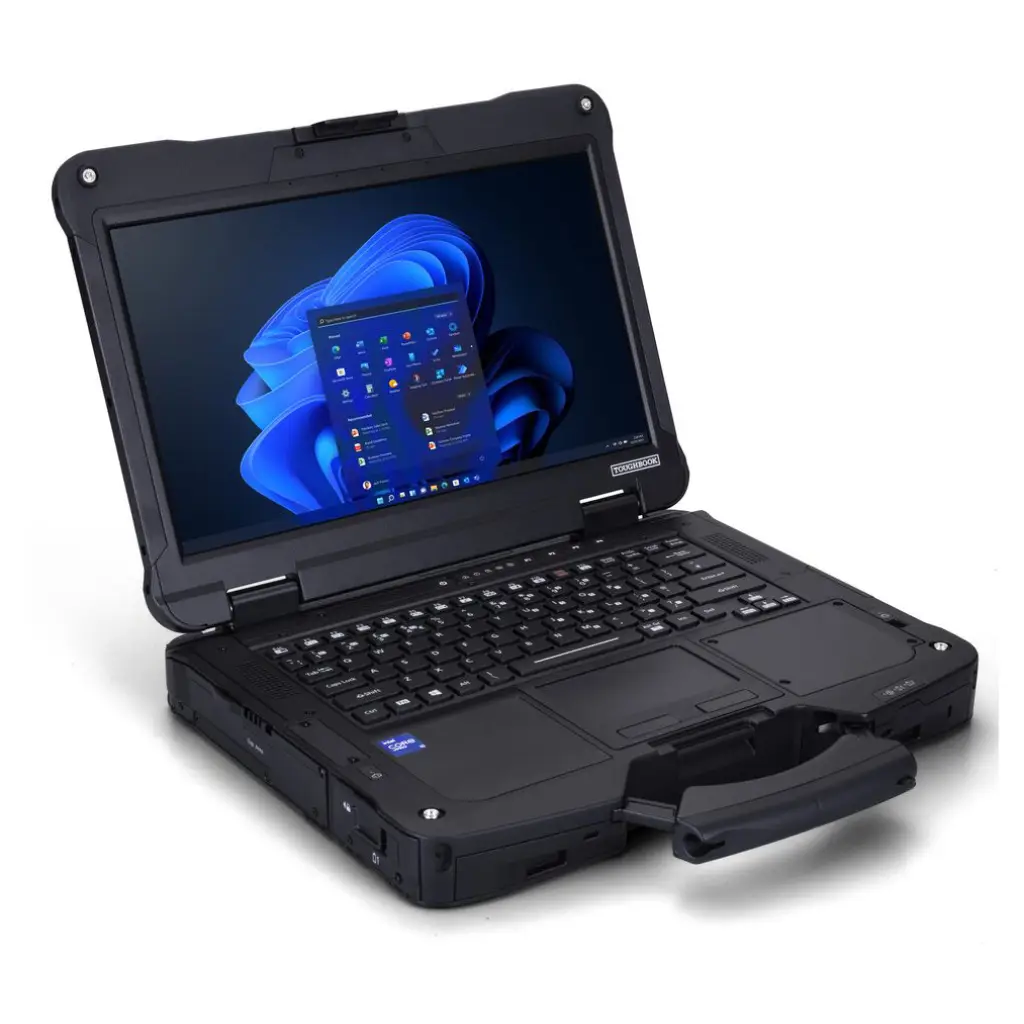
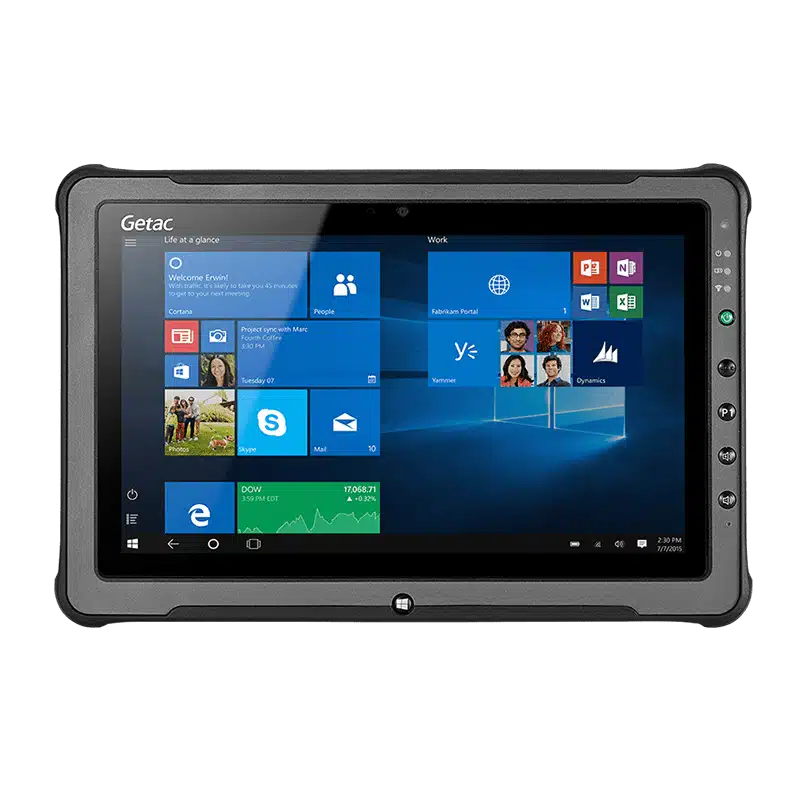
Construction teams run on two hardware profiles: rugged Windows laptops like the Panasonic Toughbook 40 and Getac S410 for BIM coordination, site management and QA in the trailer or site office, and rugged Windows tablets like the Getac F110 G6 and Dell Latitude 7230 Rugged Extreme for survey, layout, snagging and outdoor field work. All must survive concrete dust, unplanned drops from waist height, sub-zero winter mornings, and midday sunlight bright enough to wash out a consumer screen.

Trusted by industry leaders worldwide

At-a-glance comparison

Featured devices side-by-side

Featured devices side-by-side
Device Form factor OS Ruggedness Ingress Best for
Panasonic Toughbook 40 Rugged laptop Windows Fully rugged IP66 Site-office-to-scaffold BIM and drawings, keyboard needed
Getac S410 G5 Semi-rugged laptop Windows Semi-rugged IP53 Site managers working mostly from the cabin or trailer
Dell Latitude 5424 Rugged Rugged laptop Windows Semi-rugged IP52 Surveying and estimating with a keyboard, dry conditions
Getac F110 G6 Rugged tablet Windows Fully rugged IP66 Snagging and inspection walk-rounds in rain and dust
Dell Latitude 7230 Rugged Extreme Rugged 2-in-1 Windows Fully rugged IP65 One device for drawings on site and reports in the cabin
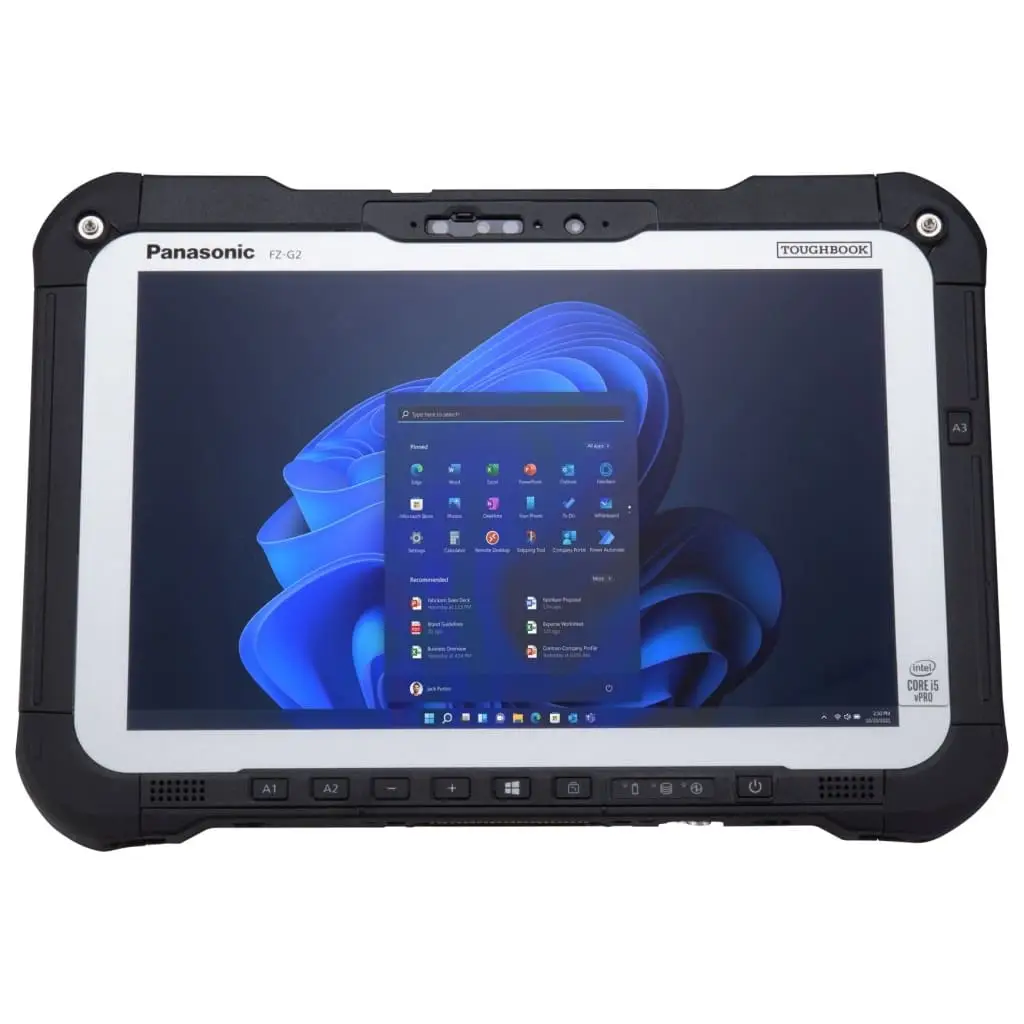
Panasonic Toughbook G2 Rugged tablet Windows Fully rugged IP65 Elevated and roofing work, one-handed carry with a strap

Speccing devices for a live build or new project mobilisation?

Tell us the phase and the workflow — BIM, site management, survey, snagging or a mix — and we’ll come back within 24 hours with a configuration matched to it.
The reality of the site

One job site, six trades, weather that doesn't wait

Construction is one of the most punishing environments a computer will ever operate in. A site engineer walks a half-finished slab in the morning to verify a rebar layout, drops into the trailer to update the BIM model at lunch, and is back out at 3pm marking snags on a punched-out floor while it starts to rain. Concrete dust coats every surface within days of pour; site power is intermittent and site Wi-Fi is either underprovisioned or nonexistent; the device is set down on formwork, on a scaffold plank, on the tailgate of a pickup, and eventually onto concrete. What separates a working construction device from a broken one isn’t a single feature — it’s that every subsystem (screen, ports, keyboard, chassis seals) has to hold up simultaneously to dust, drops, cold and sunlight, all day, for the duration of a build that may run 18–36 months.

Where it works

Site trailers and Portakabin offices, active floors and slabs, scaffolds and elevated work platforms, groundworks and earthworks, MEP roughing spaces, and the truck-cab space between all of them. Each imposes a different balance of dust, moisture, temperature and connectivity — and the device rarely stays in one for long.

What it does

BIM coordination and model walkthroughs (Revit, Navisworks, Bluebeam), site management and daily reports (Procore, Autodesk Build, Fieldwire, PlanGrid), survey and layout capture, snag/punch-list QA, drawing markup and RFI capture, and cost/quantity tracking against schedule. The workload spans compute-heavy CAD-adjacent work in the trailer and light form-capture out on the deck.

What breaks it

Concrete and gypsum dust getting into unsealed ports and fans; drops from waist-to-shoulder height onto slab or gravel; screens that wash out under direct sun and become unreadable at the exact moment a subcontractor needs to see a drawing; batteries that lose meaningful capacity below freezing; and keyboards that die the first time coffee, rainwater or curing-compound spray reaches them. Consumer laptops in this environment usually fail within one build cycle.

Why it matters

A site engineer without a working device isn't just inconvenienced — they end up making decisions from paper or memory, which is where RFIs get missed and change orders get lost. The operational cost of unreliable hardware on a construction project is measured in rework and delay, not in the sticker price of the laptop or tablet.

From reality to requirement

What construction teams actually need from a device

The specifications that separate a device that survives one full build cycle from one that ends up in a drawer by the topping-out ceremony.

MIL-STD-810H drop rating (1.2 m minimum)

The realistic drop height on site is waist-to-shoulder — 1.0 to 1.5 metres onto slab, gravel or scaffold. 1.2 m tested to MIL-STD-810H is the working threshold; 1.8 m gives margin for scaffold work and elevated platforms.

IP65 or higher against dust and rain

Concrete, gypsum and silica dust work into unsealed ports and vents over weeks, not seconds. IP65 is the working baseline; IP66 handles wind-driven rain and wash-downs at the end of a wet day. Below IP65, expect internal failure well inside the first year.

Sunlight-readable display (800+ nits)

Any device used on a deck, roof or open site needs to be readable at midday. Below 800 nits, the operator tilts the screen to find shade, misreads a drawing, or gives up and reverts to paper — all of which cost time or introduce error.

Glove-compatible and wet-screen capable touch

Site workers wear gloves and work in rain. Verify glove-mode is switchable on the specific device and that the screen rejects false touches from water droplets — both are settings, not fixed properties, and both matter every day on site.

Wide operating temperature range

Winter mornings run below freezing and roof decks in summer regularly hit 40°C+ in the sun. Confirm the operating range in writing (typical rugged spec: −20°C to +60°C) — a device rated to 0°C will not reliably boot in a January site trailer.

Sufficient compute for BIM and CAD-adjacent apps

Revit, Navisworks and Bluebeam are not lightweight — they need at least an i5 (i7 preferred), 16 GB RAM and a discrete or strong integrated GPU to walk a federated model without freezing. This rules out most low-end rugged tablets for coordinator and BIM-lead roles.

All-shift or hot-swap battery

Site power is unreliable and often shared with tools. A device with a genuine 8–10 hour battery, or a hot-swappable pack (Toughbook approach), avoids the productivity loss of hunting for a working outlet in a trailer.

Cellular / dual-SIM connectivity

Site Wi-Fi rarely reaches the whole footprint, especially on greenfield builds or infrastructure work. Built-in 4G/5G with dual-SIM keeps BIM 360, Procore and Fieldwire synced without asking workers to tether to a phone.

Speak the spec

The ratings worth writing into a construction hardware requirement

MIL-STD-810H

Drop, shock and vibration testing

The reference environmental durability standard. On site, the numbers that matter are drop height (target 1.2 m minimum, 1.8 m preferred for elevated work) and — for vehicle-mounted or crane-cab devices — the vibration profile. 'Tested to MIL-STD-810H' without a specified drop height is a marketing claim; ask for the test report.

IP65 / IP66

Dust-tight sealing and rain resistance

IP65 is dust-tight and resists low-pressure water jets — the working baseline for anything used outside the trailer. IP66 handles heavier water jets and wind-driven rain, which is worth specifying for coastal, roofing and infrastructure work.

OPERATING TEMPERATURE RANGE

Cold-morning to summer-roof rating

Standard rugged devices are typically rated −20°C to +60°C. Anything narrower will fail on a winter site or overheat on a summer roof — verify the range in writing on the quote, not just the datasheet marketing bullet.

SUNLIGHT-READABLE DISPLAY

Brightness rated in nits

Below 500 nits, screens are unreadable in direct sun. 800 nits is the working threshold for outdoor site use; 1000+ nits gives margin for south-facing roof and deck work. A 'sunlight-readable' bullet without a nit number is not a specification.

Speccing devices for a live build or new project mobilisation?

Tell us the phase and the workflow — BIM, site management, survey, snagging or a mix — and we’ll come back within 24 hours with a configuration matched to it.

24-hour tailored quotes

Same-day response on standard configurations. 24–48 hours for complex builds.

Pre-configured on arrival

OS imaging, MDM enrolment, asset tagging and app pre-load, done in-house before shipping.

3-year / 2-year / 12-month warranty

3-year on new laptops and tablets, 2-year on new scanners and handheld computers, 12-month on certified pre-owned. Extended options on request.

Trade-in on old fleets

We accept end-of-life rugged hardware against new procurement and retire it responsibly.

FAQ

Common questions about rugged devices for construction sites

For coordinators and site engineers running Revit, Navisworks, Bluebeam and Procore all day, the Panasonic Toughbook 40 is the reference specification — MIL-STD-810H, IP66, hot-swap batteries, and the compute headroom for a federated model. For price-sensitive site-office roles, the Getac S410 G5 is the strong semi-rugged alternative. Dell Latitude 5424 Rugged is the choice where the fleet is Dell-standardised.
The Getac F110 G6 is the default for outdoor site tablet work — 800-nit sunlight-readable display, IP66, MIL-STD-810H, and glove-compatible touch. The Dell Latitude 7230 Rugged Extreme is a strong alternative where the tablet needs to double as a laptop with a detachable keyboard in the trailer.
Yes — but only if specified correctly. Federated BIM models need at least an i5 (i7 preferred), 16 GB RAM (32 GB recommended for large models), an SSD and a strong integrated or discrete GPU. The Toughbook 40 and Dell Latitude 5424 Rugged in properly configured builds handle Revit and Navisworks; low-end rugged tablets do not.
Yes, provided the ingress rating is IP65 or higher. IP65 is dust-tight and resistant to low-pressure water jets — the working baseline for construction. IP66 is preferred where devices are exposed to wind-driven rain, wash-downs or high-humidity concrete pours. Below IP65, expect dust ingress to shorten device life measurably.
Yes. We support OS imaging, MDM enrolment (Intune, Ivanti, SOTI, Workspace ONE), pre-installation of Autodesk BIM 360, Procore, Fieldwire, Bluebeam and other site tools, and asset tagging — devices arrive ready to hand to the site team.
For long-lifecycle roles (superintendents, BIM leads, permanent site managers) new-in-box with a 3-year warranty is usually right. For project-duration deployments, expansion units and snagging teams that stand up for a specific phase, certified pre-owned with a 12-month warranty typically saves 40–60% and is a proven choice.
Standard-configuration quotes are returned within one business day. Configured builds (imaging, MDM enrolment, BIM/Procore pre-install, asset tagging) typically add 1–2 business days. In-region EU deliveries via UPS then arrive within 1–3 business days.

Need 10+ Rugged Devices?

Get a custom quote from our enterprise team. Volume pricing, pre-configuration and global delivery available.

Get Started

Request Your Quote

Tell us about your devices and we’ll get back to you.